Stop Alt-Tab Ping-Pong.Copy 9 Things at Once.
Copy Dock is a high-speed, lightweight desktop utility for macOS and Windows. Save up to 9 separate items to independent memory slots and paste them instantly with global system hotkeys. Your pre-existing clipboard is restored automatically.
 Download for macOSWindows user? Coming soon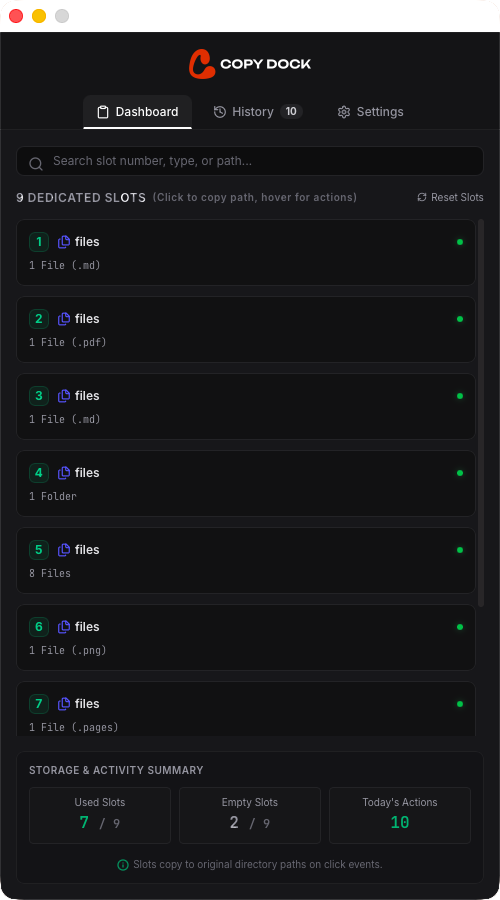
Designed for Fast Keyboard-Driven Workflows.
High-performance utilities built specifically for developers, marketers, and power users.
Zero-Mouse Interaction
Operate at the speed of thought. Load slots and paste contents using system-wide global hotkeys without ever taking your hands off the keyboard.
9 Dedicated Memory Slots
High-speed, numbered slots (1–9) that hold distinct items simultaneously. Fill your slots in one pass, then paste each item exactly where you need it.
Non-Destructive Restoration
After pasting a slot, Copy Dock instantly restores your system clipboard's pre-existing content. Your normal copy-paste workflow remains completely undisturbed.
100% Local & Private
Your data is strictly yours. Powered by an offline local SQLite database with zero cloud tracking, analytics, or external servers.
Multi-GB File Path Safety
Never risk frozen memory. Copy Dock only references paths for heavy files (videos, archives, folders) and checks existence before pasting.
Searchable Local Audit Log
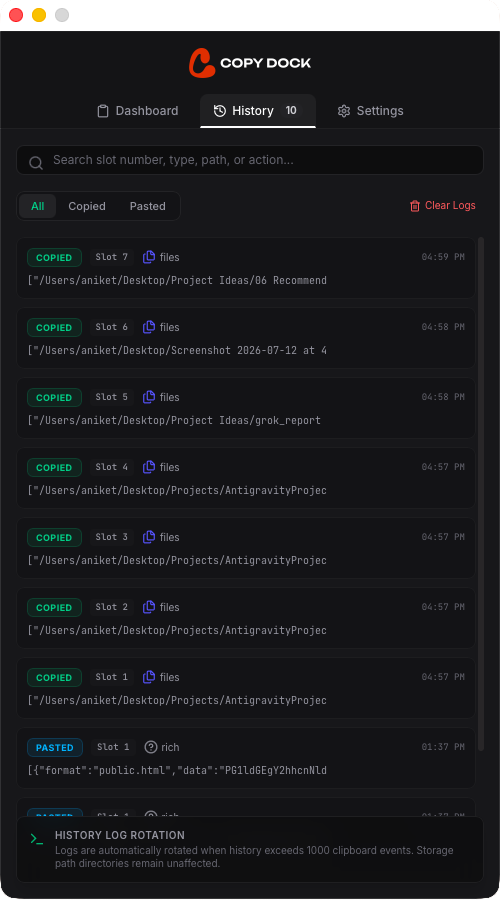
Keep track of your clipboard history. Search and filter through past copies and slot assignments through a premium, high-contrast dashboard.
Master the Keyboard shortcuts.
Copy and paste system-wide without touching your mouse.
Action
Save to SlotCopy selected text or files and place them directly into a specific numbered slot.
Action
Paste from SlotPaste content stored in a slot into any active cursor location instantly.
Risk-Free Guarantees.
We stand by the simplicity, velocity, and offline nature of Copy Dock.
Always Offline Local Storage
We have no servers and collect zero telemetry. All database entries are saved in an encrypted SQLite database stored locally on your machine.
Free Updates for Life
Buy your license key once and receive every single update, performance patch, and new feature release forever at zero additional cost.
30-Day Money-Back Promise
If Copy Dock does not dramatically speed up your workflow within 30 days of purchase, email us for a full, no-questions-asked refund.
Everything you need to know.
What is Copy Dock?
Copy Dock is a high-speed, multi-slot clipboard manager designed to eliminate 'Alt-Tab ping-pong' during repetitive, keyboard-driven copy-and-paste workflows. Instead of copying one item, switching windows, pasting it, and switching back, Copy Dock allows you to load up to 9 separate items into dedicated memory slots and paste them instantly using global hotkeys.
How does Copy Dock solve the Alt-Tab bottleneck?
Traditional copy-pasting forces you to switch back and forth between your source and target windows for every single item. With Copy Dock, you can copy up to 9 different pieces of information (like a username, email, phone number, and address) into memory slots 1 through 9 in a single pass. You then alt-tab just once to your target application and paste them in any order directly using hotkeys.
What is the difference between Copy Dock and a traditional clipboard history manager?
Traditional clipboard managers record everything you copy, but pasting requires opening a popup list, scrolling or searching, and using your mouse/arrow keys. This breaks your touch-typing flow. Copy Dock uses fixed, override-only slots bound directly to global system hotkeys. It requires no visual search or mouse interaction—it operates entirely at the speed of thought.
Does Copy Dock disturb my normal system copy-paste workflow?
Not at all. Copy Dock features non-destructive clipboard restoration. When you trigger a paste from a slot, Copy Dock briefly sets the system clipboard to that slot's item, performs the paste command, and immediately restores your original clipboard content. Any active copy-paste sequence outside of Copy Dock is completely untouched.
Can Copy Dock handle large files, folders, and high-resolution images?
Yes, safely. Copy Dock does not load heavy file contents (like 4K video clips or multi-gigabyte ZIP archives) into memory. Instead, it stores the reference file paths. Before pasting, it automatically verifies that the file still exists at the original disk location. If it was deleted or moved, a clean, non-blocking desktop toast notification lets you know.
Is my clipboard data private and secure?
Absolutely. Copy Dock runs entirely local to your device and stores all configurations and slots in an offline SQLite database. We collect zero telemetry, have no servers, and offer no cloud integrations. Your sensitive clipboard data (passwords, tokens, drafts) never leaves your physical machine.
What data types does Copy Dock officially support?
Copy Dock supports plain text, rich text (HTML/RTF formatting is kept intact), images copied from files or explorer, and file/folder paths. Apps like Photoshop with custom proprietary clipboard layers are ignored in version 1.0 to ensure system-wide stability.
Can I customize the default system hotkeys?
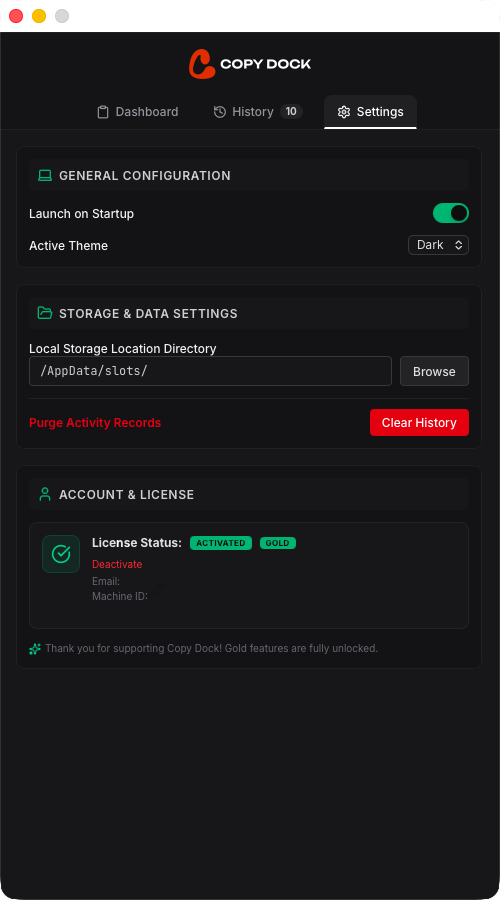
Yes. In the Settings tab of the Copy Dock dashboard, you can customize both the 'Save to Slot' and 'Paste from Slot' key combinations, configure startup preferences, choose between dark and light themes, and manage database locations.
Supercharge your
copy-paste workflow today.
Available for
Coming soon for
 Windows
 Linux
Linux